

Upload · Flushd AI
Flushd AIstep 1 of 2

Upload your swing

Any clear video works. These four sharpen the read and take about a minute to set up.

Record it like this
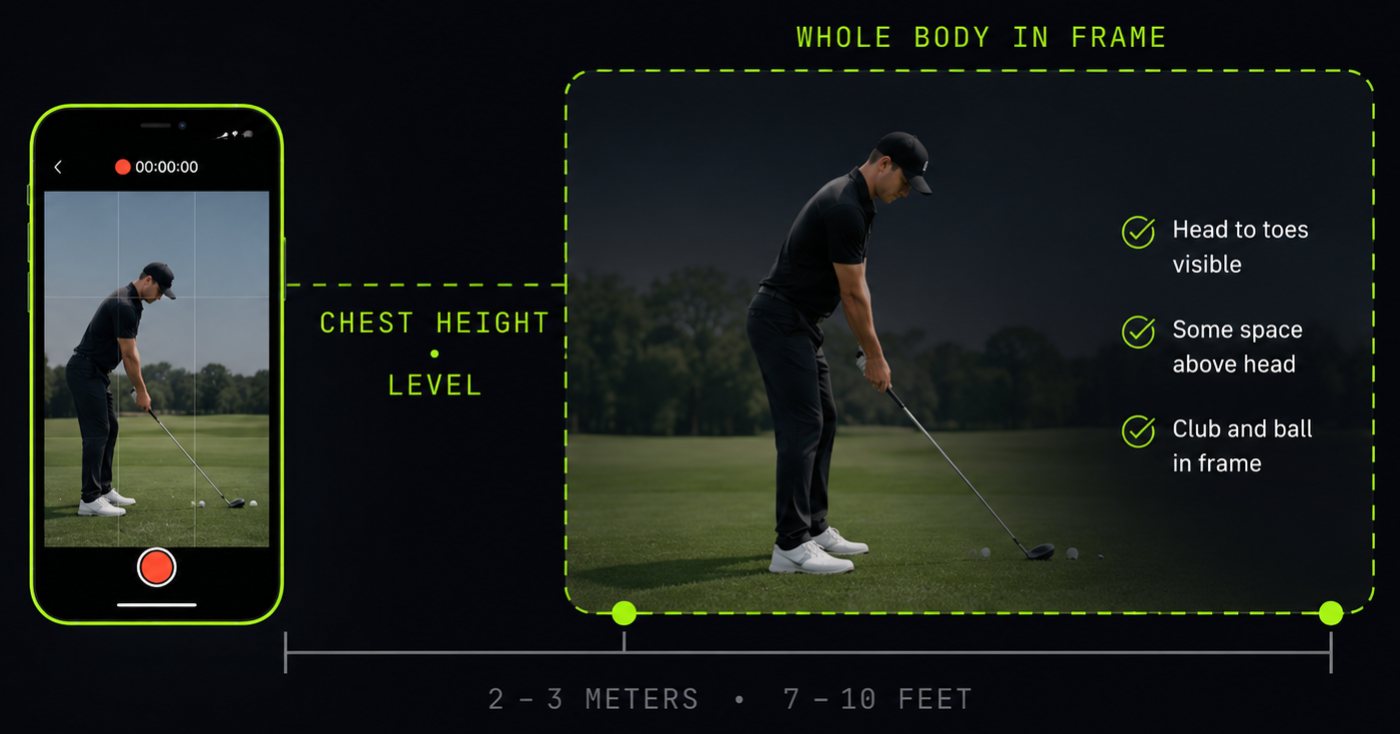
Side view of the setup: the phone is held at the golfer's chest height and kept level, two to three metres back, with the whole body from head to toes inside the frame and some space above the head.

Held level, not tilted up from the ground. A plain background helps.

Slow motion, 120 fps Most phones have it. Gives us the frames to place impact precisely.
5 to 8 swings Comparing them is how a habit separates from a one-off.
Take your stance, then pause One still second gives a clean read on stance, knees and posture.
Both angles if you can Face-on reads setup, weight and rotation. Down-the-line reads plane, posture and whether you come over the top.

Send it as filmed, cuts and all. We find the swings ourselves, and an edit between them can read as sudden movement.

One is enough. Two gives the full picture, and they don’t need to be the same swing. Film one angle, then the other. On a phone, tap your video and it starts coming across straight away — there is no Done or Add button to press. A long clip can take a few seconds, so give it a moment before you decide something has gone wrong.
Getting this wrong reverses every finding, so it needs a tap.
FT IN
Optional. Enables distance estimates.
Uploading…
Large files take a while to upload.

One or two clips · .mov or .mp4

Flushd AI